
Logging an Expense

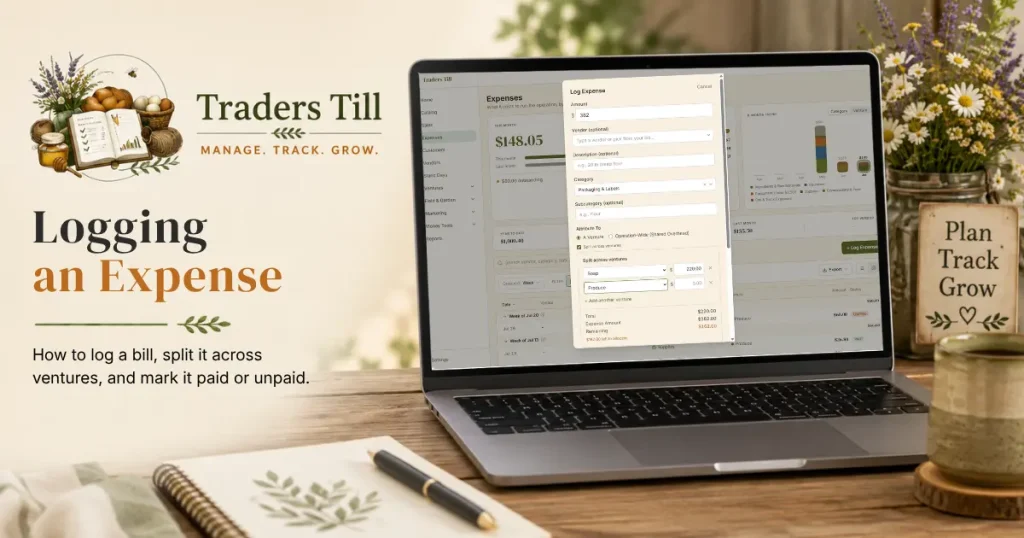
Every dollar you spend on the operation belongs in the ledger, whether it is a 50 pound bag of feed, a booth fee, or the insurance bill you have not paid yet. Logging expenses as they happen is what makes your per-venture profit numbers real instead of hopeful. The form is built to be fast enough to use from your phone in the feed store parking lot.
How do I log an expense?
Open Expenses from the bottom nav on mobile (or the sidebar on desktop) and tap Log Expense. The entry sheet slides up with the cursor in the amount field.
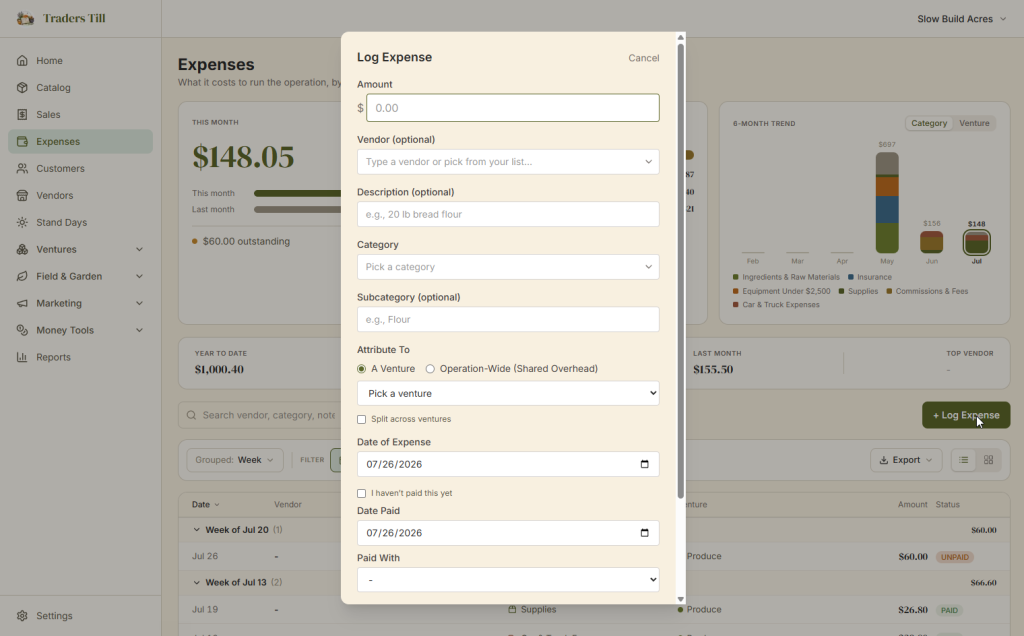
- Enter the
Amount. - Optionally add a
Vendorand aDescription(like “20 lb bread flour”). - Pick a
Category. The list is curated from the IRS Schedule C and Schedule F categories, so tax time maps cleanly. You can add your own free-textSubcategoryunder it (like “Flour” under Supplies). - Choose where the cost belongs: a venture, a split across ventures, or operation-wide. More on this below.
- Set the
Date of Expense, confirm theDate PaidandPaid Withmethod (or mark it unpaid), and tap Save Expense.
Logging a stack of receipts? Use Save & Log Another. The form clears the amount and description but keeps the vendor, category, date, and payment method from the last entry, since receipts from the same errand usually share them.
What do the two dates mean?
Date of Expense is when the cost happened; Date Paid is when the money actually left your hands. Most of the time they are the same day and you never think about it. They differ when you are invoiced: the feed store bills you in March and you pay in April.
Traders Till stores both dates on every expense. Cash-basis views count the expense when it was paid. Accrual-basis views count it when it was incurred. Recording both from day one means your books can answer either question later without re-entry. See Cash vs Accrual for why that matters.
What if I haven’t paid it yet?
Tick I haven’t paid this yet and the payment date and payment method fields disappear. The expense saves with no payment date, shows an “Unpaid” badge in the ledger, and counts in the accrual view only. Your cash-basis numbers stay untouched until money actually moves.
When you pay the bill, open the expense and record the payment date and method. Within 24 hours of logging, that is a plain edit. After 24 hours, it is saved as a correction (the original and the corrected version both stay in your history).
How do I attribute the expense to a venture?
Every expense lands in at least one venture, because per-venture profit is the whole point. The form gives you two choices under Attribute To:
- A Venture. Pick the venture this cost serves. Chicken feed goes to your chicken venture, flour to the bakery.
- Operation-Wide (Shared Overhead). For costs that cover the whole operation, like insurance, fuel, or general booth fees. These land in your Operation Overhead venture and stay out of any single venture’s profit, so no one venture looks worse than it is.
If you are not sure, ask “would this cost go away if I shut down one venture?” If yes, it belongs to that venture. If it would stick around regardless, it is operation-wide. See What Is a Venture for the full picture.
How do I split one expense across several ventures?
Check Split across ventures and the split editor opens. One feed run might cover both the chickens and the goats; a split records that honestly instead of dumping it all on one venture.
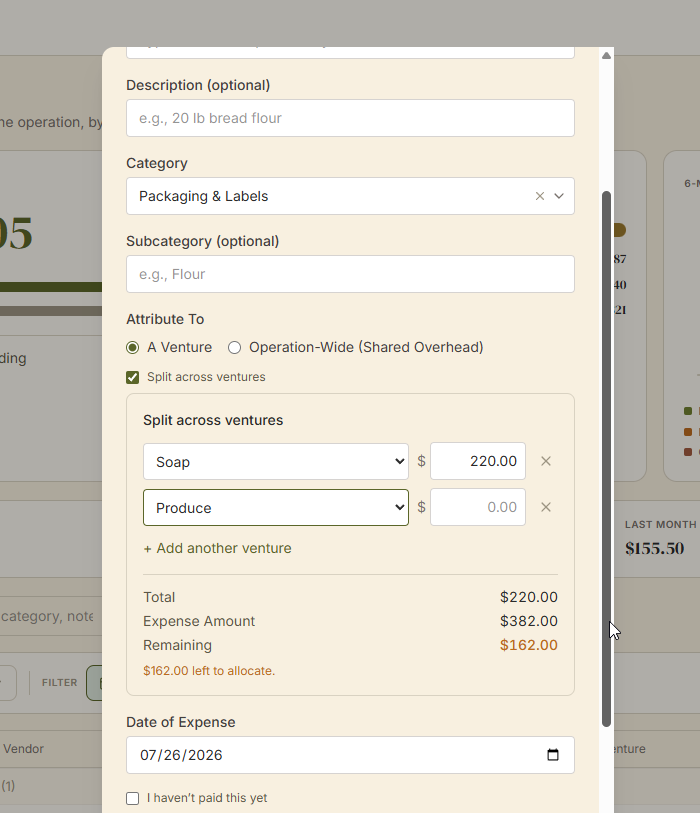
- Each row is a venture plus a dollar amount. Splits are entered in dollars, not percentages.
- Use + Add another venture for more rows. Each venture can appear only once, and a split needs at least two.
- The Total / Expense Amount / Remaining readout updates as you type. The rows must add up to the exact expense amount, to the penny, before the form will save.
Behind the scenes, each row becomes its own allocation, so every venture’s P&L picks up exactly its share.
What if I made a mistake?
For 24 hours after you log an expense, you can open it and Edit anything freely. The clock runs from when you logged it, not from the expense date.
After 24 hours, changes to the money fields go through Correct instead. The app keeps the original, records an offsetting reversal, and adds the fixed version, with an optional note about why. All three stay visible in the expense’s correction history. It sounds formal, but it is what keeps your books trustworthy at tax time: numbers change, and the trail shows how.
Common questions
Can I change an expense after I save it?
Yes. For 24 hours after you log it, Edit lets you change anything. After that, changes to the money fields (amount, category, dates, payment method, or venture allocations) are saved as a correction: the app keeps the original, adds an offsetting reversal, and records the fixed version. Both stay in your history so your numbers stay honest.
Do splits use percentages or dollar amounts?
Dollar amounts. Each split row gets a venture and a dollar figure, and the rows must add up to the exact expense amount. A running Total / Expense Amount / Remaining readout shows how much is left to allocate as you type.
What payment methods can I record on an expense?
Cash, Card, Check, ACH / Bank Transfer, or Other. The Paid With field only appears when the expense is marked as paid. If you tick "I haven't paid this yet," both the payment date and payment method stay empty until you come back and mark it paid.
Do I have to enter a vendor?
No, the vendor field is optional. It is worth filling in, though: Traders Till keeps a vendor list and rolls up what you have spent with each one, so a stack of feed store receipts turns into a per-vendor spending picture over time.
Can I tag a booth fee to a specific farmers market?
Yes. If you have markets or events set up, the expense form shows a Market / Event dropdown. Tagging a booth fee (or any cost) to the market it belongs to feeds the Booth ROI view, which weighs what a market costs you against what you sell there.
Keep Reading