
What Is a Venture (and Why Everything Has One)

Sooner or later every home producer asks the same question: “are the chickens actually making money?” Gut feel says yes. The feed bills say maybe. Ventures are how Traders Till answers that question with numbers instead of vibes, and they are the reason the app asks you to pick one when you add a product or log an expense. This article explains what a venture is, where yours come from, and how the pieces connect.
What is a venture?
A venture is a profit center: one part of your operation whose money you want to see on its own. Chickens is a venture. Bakery is a venture. Soap, Cut Flowers, and your U-Pick Pumpkin Patch can each be one too. Every venture gets its own profit and loss view, so “how are the bees doing?” has a real answer.
Think of ventures as the labeled jars your money flows through. Revenue from selling eggs goes in the Chickens jar. The feed bill comes out of the same jar. At the end of the month, what is left in the jar is that venture’s profit. Without the jars, everything pools together and a thriving bakery can quietly subsidize a flock that costs more than it earns.
Why does every product, sale, and expense need a venture?
Because attribution at entry time is the only way per-venture profit works without homework. Traders Till asks for the venture once, at the natural moment, and never again:
- Products carry a venture from the day you add them. Picking one is part of the Add Product form (see Adding Your First Product).
- Sales inherit the venture from the products sold. When you record a sale, each line snapshots its product’s venture at that moment, so the revenue rolls up correctly even if you reorganize things later. Nothing to pick at the market table.
- Expenses get attributed when you log them: to one venture, split across several, or operation-wide (see Logging an Expense).
The payoff is that profit-by-venture is a side effect of normal record keeping. No end-of-month tagging session, no spreadsheet surgery. If you have ever tried to reconstruct “what did the goats cost me this year?” from a shoebox of receipts, this is the feature that makes sure you never do it again.
Where do my ventures come from?
Most ventures create themselves when you tell Traders Till what you do. There are three sources:
- Modules. When you pick a hobby during onboarding (or turn on a module later), the matching venture appears automatically. Turning on Bakery creates a Bakery venture.
- Revenue streams. For areas that usually run several streams, onboarding asks which ones you sell. Checking “Egg Layers” under Chickens creates an Egg Layers venture, so eggs and meat birds can be judged separately.
- Custom ventures. Anything without a module can still be a full profit center. Create it yourself in
Settings → Ventures.
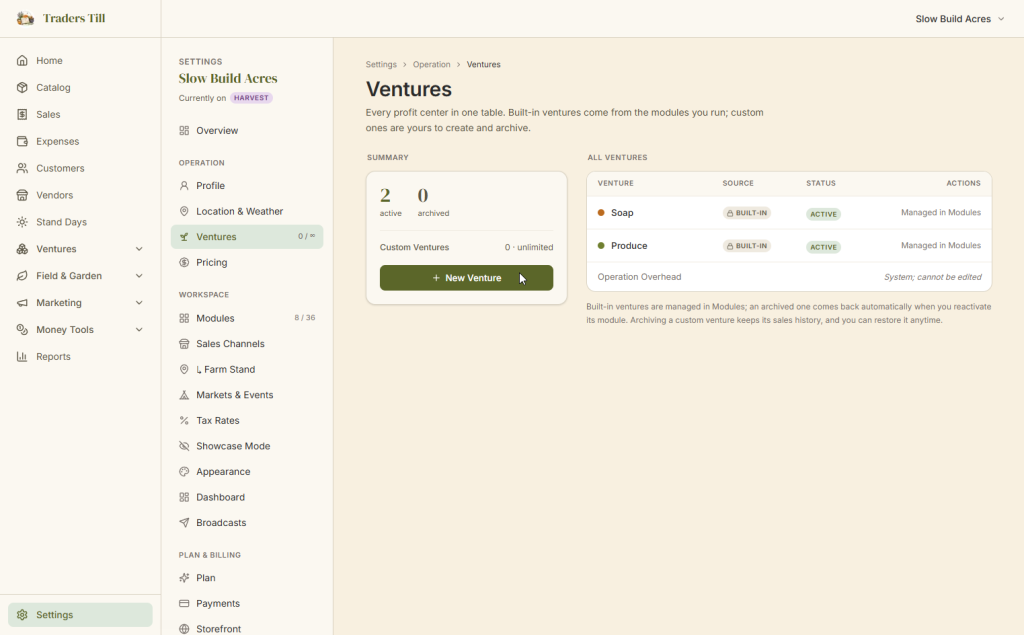
The Ventures page in Settings lists everything: built-in ventures marked “Built-in,” your own marked “Custom,” grouped by category, with the counts up top.
How do I create a custom venture?
In Settings → Ventures, tap New Venture, give it a name (up to 60 characters, and it must be unique among your ventures), and pick a category: Animals, Plants, Makers, or Other. The category controls where the venture rolls up in reports.
You can also attach a custom venture to an existing module so it reports under that module’s umbrella, or leave it standalone. A custom venture behaves exactly like a built-in one: its own P&L, available in every picker, no second-class treatment. “Holiday Wreaths,” “Catering Side Hustle,” and “Wedding Officiating” are all fair game.
Custom ventures are the supported path for anything Traders Till does not have a dedicated module for. If you make plaster molds or sell DIY paint kits, a custom venture plus the regular catalog and sales tools covers the whole loop.
Is there a limit on custom ventures?
On the Free tier, you get 3 custom ventures. Built-in ventures never count toward the cap, so a Free account running Bakery, Chickens, and Bees plus three custom ventures is perfectly normal. The Ventures page shows a Custom Ventures meter so you always know how many slots you have used. Paid tiers, starting at Sprout, remove the cap entirely. See Free vs Paid for the full tier picture.
What is the Operation Overhead venture?
Operation Overhead is the venture for costs that belong to the whole operation instead of any single part of it. Every account gets one automatically at signup, before you have set up anything else. It exists so that liability insurance, fuel, and similar whole-operation costs have an obvious home from day one, without polluting any one venture’s numbers.
A few things make it different from every other venture:
- It cannot be renamed, archived, or deleted, and you cannot create a second one.
- Products cannot attach to it. It is for expenses only; if you try, the app asks you to pick a revenue venture instead.
- The expense form keeps it out of the regular venture picker. You reach it through the Operation-Wide (Shared Overhead) choice instead, which attributes the whole expense there in one tap.
- It is excluded from venture-to-venture profit comparisons. An overhead bucket only ever shows costs, and parking it next to your revenue ventures would make it look like a business unit that always loses money. It appears on its own card instead.
What if one venture supplies another?
Sometimes one venture feeds another, and Traders Till records that as an inter-venture transfer so nothing gets double-counted. The clearest case is a bundle: a gift basket that lives in your Bakery venture but includes a bar from Soap. When the basket sells, Bakery books the sale revenue, and the app automatically records a transfer that credits Soap for its component at cost. Soap gets paid for its contribution, Bakery carries the full cost of goods, and the operation’s total revenue is counted exactly once. No cash moves, so both accounting dates match, and it all happens at sale time with nothing for you to enter.
Where do ventures show up across the app?
Once your ventures exist, they surface everywhere your money does. The ones you will see daily:
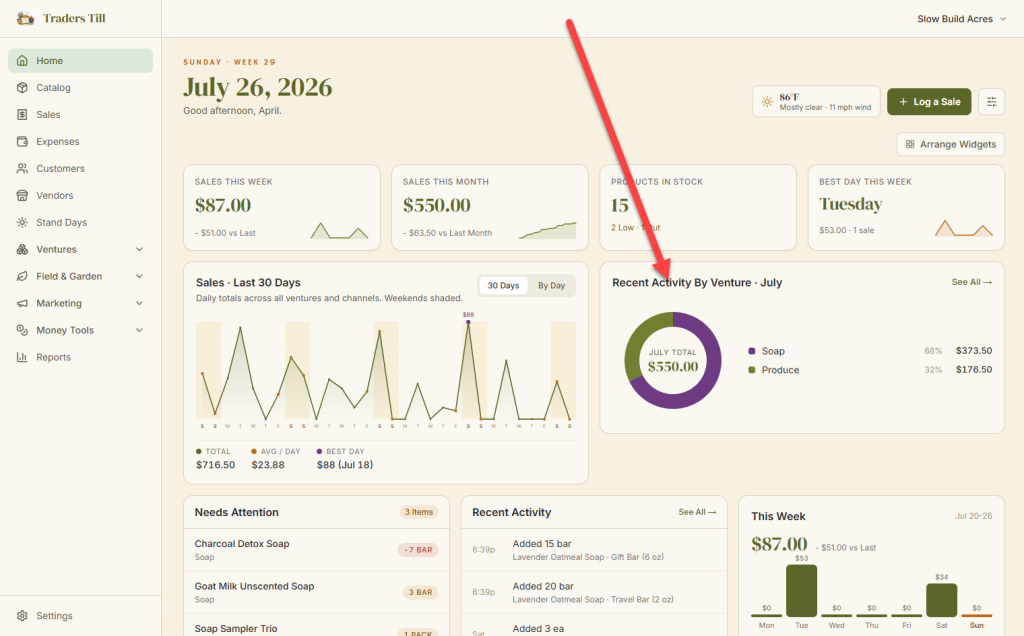
- Home dashboard. The Sales by Venture chart breaks down where this month’s sales came from, venture by venture.
- Expenses. The ledger has a Venture column (split expenses show a “Split” tag), and you can filter or group the whole ledger by venture.
- Reports. The P&L view breaks profit out by venture, with Operation Overhead on its own card.
- Catalog. Every product shows the venture it belongs to, set when you add it.
Can I rename, edit, or archive a venture?
It depends on where the venture came from:
- Custom ventures are fully yours: rename them, change the category, change the module attachment, archive and unarchive them at will.
- Built-in ventures can be renamed, but their category and module ties are fixed, since the module that created them defines where they report. To retire one, toggle its module off in
Settings → Modules. - Operation Overhead cannot be changed at all.
Archiving never deletes anything. An archived venture drops out of the day-to-day pickers, but its whole history, every sale and every expense allocation, stays on the books and keeps showing up in reports for the periods it was active. That is deliberate. Your P&L is a story, and archiving a venture ends a chapter without tearing it out of the book.
Common questions
How many ventures can I have in Traders Till?
Built-in ventures (the ones created when you turn on a module, like Bakery or Egg Layers) are unlimited on every tier and never count toward a cap. Custom ventures you create yourself are capped at 3 on the Free tier; paid tiers remove the cap. The Settings page shows a meter of how many custom slots you have used.
What is the Operation Overhead venture and can I delete it?
Operation Overhead is a venture every account gets automatically at signup. It holds whole-operation costs like insurance and fuel that do not belong to any single venture. It cannot be renamed, archived, or deleted, and you cannot create a second one. It stays out of your venture-to-venture profit comparisons so it never looks like a "losing" venture.
Can a sale include products from more than one venture?
Yes. Each product already carries its venture, so when one sale has a sourdough loaf from Bakery and a dozen eggs from Chickens, each line's revenue rolls up to its own venture automatically. You never pick a venture at sale time.
What happens to my data if I archive a venture?
Nothing is deleted. Archiving hides the venture from day-to-day pickers, but its sales and expense history stay on the books, and you can unarchive it any time. Ventures with expense history cannot be hard-deleted at all, which is deliberate: your P&L should never lose a chapter.
Why can't my supply items have a venture?
Supplies are the one exception to the "everything has a venture" rule. A supply is a shared raw input, like flour or jars, that is never sold on its own and often feeds several ventures. Its cost reaches the right venture when a recipe consumes it to make a real product, so attributing the supply itself would double-count.
Keep Reading