
Cash vs Accrual, Which P&L Am I Looking At?


If you have ever wondered why two screens in Traders Till show slightly different totals for the same month, this is almost always the answer. The app keeps two dates on every financial record, and different views count by different dates. Neither number is wrong. They answer different questions.
Why does Traders Till store two dates on every transaction?
Because “when did I earn this” and “when did the money move” are not always the same day, and both answers matter. Every sale stores a Sale Date and a Payment Date. Every expense stores a Date of Expense and a Date Paid. This is built into the data from day one, so you never have to re-enter anything to see either view.
For most of what you do, the two dates match. When you record a sale on the Quick Sale Pad, both dates are set to today, because the customer paid you at the table. When you log an expense you already paid, the dates usually match too.
They split apart in two common cases:
- You deliver a wholesale order and invoice it, so the sale happened today but the money arrives later. The sale’s
Payment Datestays empty and the Sales list shows it as Unpaid. - You log an expense and check I haven’t paid this yet, so the cost exists but no cash has left. The expense shows an Unpaid badge until you give it a
Date Paid.
Accountants call these two ways of counting cash basis (count when money moves) and accrual basis (count when the sale or bill happened). Traders Till keeps both without asking you to pick a side. The IRS covers the formal definitions in Publication 538, Accounting Periods and Methods.
Which screens use which date?
The Profit & Loss report defaults to cash, and the sales dashboards run on the sale date. Here is the map:
- The Profit & Loss report at
/reportsdefaults to the cash view. The note under the total reads “Cash basis: counts money in and out by the date it was paid.” - The home dashboard and the Sales page dashboards count by sale date, so a day’s sales always show up on the day you made them, paid or not.
- The Schedule C / F report (Reports, under Taxes & Accounting) is always cash basis, the way most home producers file.
- The Customers page shows invoiced-but-unpaid wholesale sales in the Wholesale, owed to you card, with due dates and any overdue amount.
How do I switch the P&L between cash and accrual?
With the Basis toggle at the top of the Profit & Loss report. Open /reports, pick Profit & Loss from the report list, and you’ll see three buttons: Cash, Accrual, and Combined. The toggle comes with the Bloom tier’s Taxes & Accounting tools; the Reports hub itself is available on Sprout and up.
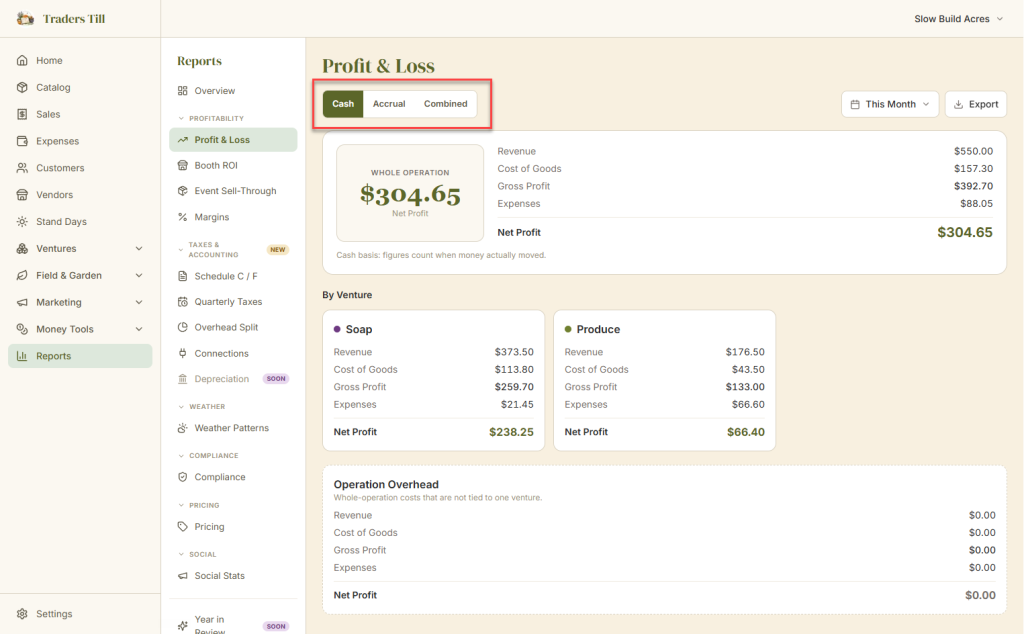
Each choice changes only which date the report filters on. Nothing is re-recorded:
- Cash counts every figure by payment date. Tooltip: “Money in hand: counted when it was actually paid.”
- Accrual counts by sale or expense date. The note under the total changes to “Accrual basis: figures count when the sale or bill happened, paid or not.”
- Combined shows both, side by side.
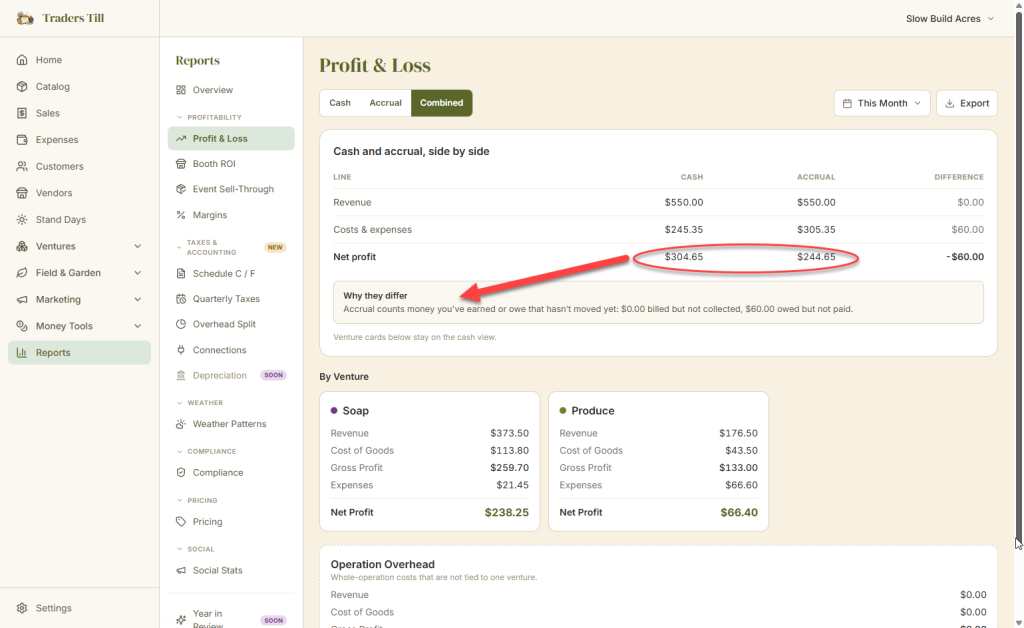
The Combined view is the one to open when the two numbers disagree and you want to know why. It puts revenue, costs, and net profit in a table with a Cash column, an Accrual column, and the difference. Under the table, a “Why they differ” note spells out the gap in plain words: how much you have billed but not collected, and how much you owe but have not paid. When everything in the period has been paid, it says so: “Every sale and bill in this period has been paid. The two views match.”
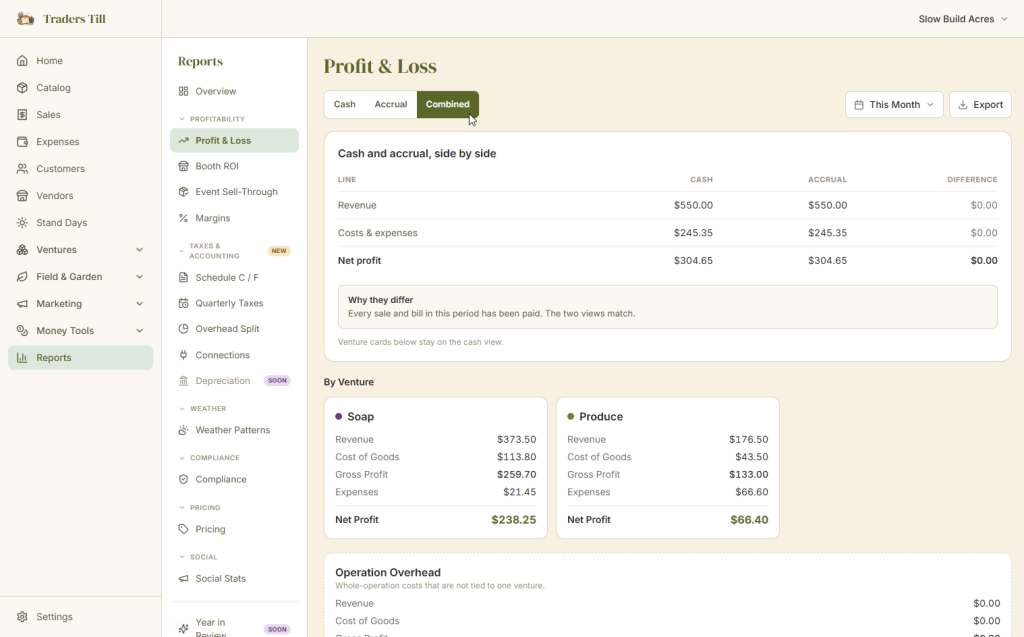
One detail worth knowing: the per-venture cards below the operation total stay on the cash view even when the toggle is set to Accrual or Combined. The report says so in a footnote.
What does a wholesale invoice look like in each view?
It shows up in accrual the month you delivered and in cash the month you got paid. Walk through a concrete example.
Say you deliver a $240 wholesale order to a local shop on July 28, on net-30 terms. You record the sale with July 28 as the Sale Date and leave the Payment Date empty. Because the customer is a wholesale account with payment terms on file, Traders Till derives a due date automatically, and the sale appears in the Wholesale, owed to you card on the Customers page. The check arrives August 12, and the sale gets August 12 as its Payment Date.
Now look at July in the Profit & Loss report:
- Accrual view: the $240 is in July revenue. You earned it in July, so July gets credit.
- Cash view: the $240 is not there. No money moved in July.
And August:
- Accrual view: nothing. The sale belongs to July.
- Cash view: the $240 lands in August, the month the check cleared.
The same logic runs on the expense side. Log a $60 feed bill on July 30 and check I haven’t paid this yet: the accrual view counts the $60 in July’s costs, and the cash view ignores it until you fill in the Date Paid. The expense detail page reminds you with a note: “Not yet paid, counted in accrual view only.”
When should I look at cash, and when at accrual?
Cash answers “can I afford supplies this week,” and accrual answers “was July actually profitable.” That is the whole rule of thumb.
Use the cash view when the question is about money you can spend. If the cash view says you kept $400 this month, that $400 exists. Invoices you are still waiting on are not in it, which is exactly what you want when you are standing in the feed store deciding what to buy.
Use the accrual view when the question is about how the operation performed. If you had a huge wholesale month but the checks arrive next month, the cash view makes this month look slow and next month look great. The accrual view puts the revenue where the work happened, so you can compare months honestly and see whether a venture is really carrying its weight.
Most home producers live in the cash view day to day, glance at accrual at month end, and open Combined when the two disagree by more than pocket change. If you are choosing a basis for tax filing, that is a conversation for your tax preparer, not a setting in the app. The Schedule C / F report hands them cash-basis totals either way.
Sources
Common questions
Why doesn't my Sales page total match my Profit & Loss report?
They count by different dates. The Sales page and the home dashboard total sales by their sale date. The Profit & Loss report defaults to the cash view, which counts by payment date. For everyday sales both dates are the same day, so the numbers agree. The gap appears when you have unpaid invoices or expenses logged but not yet paid.
Do I need the accrual view if I only sell face to face?
No. When every sale is paid on the spot and every expense is paid when you buy, both dates on every record are the same day, so the cash and accrual views show identical numbers. The accrual view starts to matter once you invoice wholesale accounts or log bills you haven't paid yet.
Which basis does the Schedule C / F tax report use?
Cash. The Schedule C / F report in Reports under Taxes & Accounting always totals your year on a cash basis, which is how most home producers file. The note on the report says so, and it also excludes collected sales tax from income.
What makes the cash and accrual numbers differ?
Money that has been earned or owed but hasn't moved yet. Sales you invoiced but haven't collected push accrual revenue above cash revenue. Expenses you logged but haven't paid push accrual costs above cash costs. The Combined view lists both amounts in a "Why they differ" note under the table.
Where is the cash vs accrual toggle?
On the Profit & Loss report at /reports. The Basis toggle with Cash, Accrual, and Combined buttons sits above the report and comes with the Bloom tier's Taxes & Accounting tools. On Free and Sprout the P&L runs on the cash view. The Reports hub itself is part of Sprout and up.
Keep Reading