
Password Reset and Logging In with Google

Locked out? This one covers the two sign-in paths (password and Google), how they interact, and what to do when a reset email never shows up.
How do I reset my password?
From the login page, tap Forgot your password?
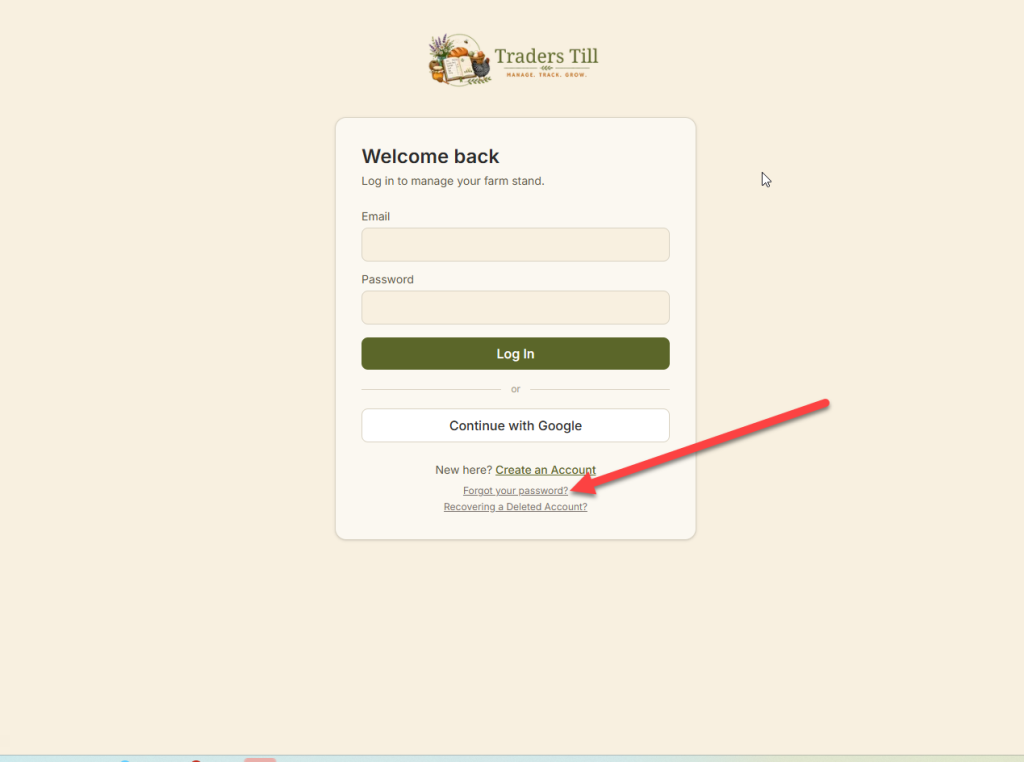
and follow these directions:
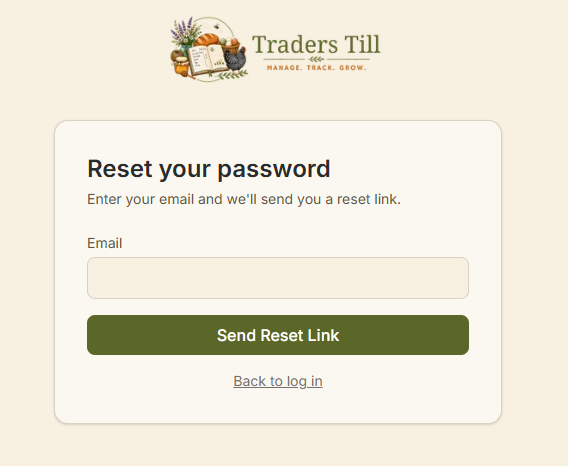
- On the
/forgot-passwordpage, enter your email and tap Send Reset Link. - Check your inbox for “Reset your Traders Till password” and open the link. It expires in 1 hour and works once.
- Choose a new password with at least 8 characters, one number, and one symbol, then save.
- You are sent back to the login page with a “Password updated” note. Log in with the new password.
If the link page says “Link expired” or “Link not found”, the hour passed or the link was already used. Request a new one; requesting again also cancels any older link.
Why didn’t the reset email arrive?
The most common reason is that your account has no password, because you created it with Continue with Google. The reset flow only emails accounts that actually have a password, but the screen says “check your email” either way (that keeps strangers from testing which emails have accounts). So a Google account can request resets forever and never receive one.
Not sure which way you signed up? Try Continue with Google on the login page first. If you are signed in after that, mystery solved. Also worth checking: the spam folder, and that you typed the same email you signed up with.
How do I log in with Google?
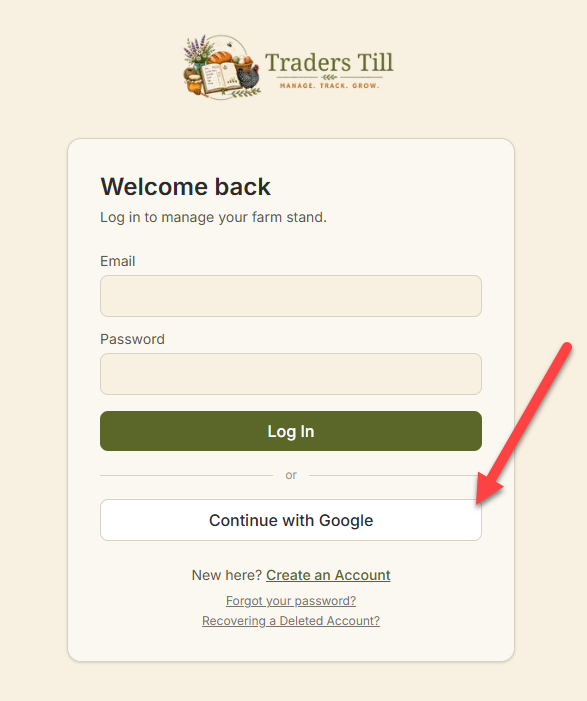
Tap Continue with Google on the login or signup page and pick your Google account. There is no password on a Google account, and you can check this anytime in Settings, under Sign-in & Email, where the password row reads “Not set” for Google sign-ins.
Two rules about how the two sign-in methods mix:
- Signed up with Google, typed a password anyway? You will see “That email and password didn’t match. Try again.” There is no password on the account to match. Use the Google button.
- Signed up with email and password, then tried the Google button? The two do not link automatically, even with the same email address. You will bounce back to the login page with an error. Log in with your email and password instead.
If you try to create a brand-new account with an email that already exists, signup stops with “An account with that email already exists. Try signing in instead.” That is another hint about which method you used the first time.
What is the recover page for?
The /recover page brings back a deleted account, not a forgotten password. If you deleted your Traders Till account, you have 30 days to change your mind: open Recovering a Deleted Account? on the login page, enter your email and password, and tap Recover Account. Your data comes back exactly as it was. After 30 days, recovery is no longer possible.
One limit: recovery works with email and password only. If the deleted account signed in with Google and never had a password, the form cannot verify you; contact support.
What if I have two-factor authentication turned on?
If you enabled two-factor authentication (in Settings, under Sign-in & Email), the login page asks for a 6-digit code from your authenticator app after you enter a correct email and password. A backup code works in the same field if your phone is missing. Resetting your password does not turn off two-factor; a full 2FA lockout guide is coming as its own article.
Common questions
How long does the password reset link last?
One hour, and it works exactly once. Requesting a new link also cancels any earlier link you were sent, so always use the newest email. If a link says invalid or expired, just request a fresh one from the forgot-password page and use it right away.
I never got the password reset email. What should I do?
First check spam for a message titled "Reset your Traders Till password". If it is not there, you most likely created your account with Google. Google accounts have no password, so no reset email is sent. Go back to the login page and tap Continue with Google.
Can I add a password to my Google account?
Not yet. If you signed up with Google, the Sign-in & Email page in Settings shows your password as "Not set", and there is currently no way to set one. Continue with Google is your sign-in method.
I deleted my account. Can I get it back?
Yes, within 30 days of deleting. Open the "Recovering a Deleted Account?" link on the login page and log in with your email and password to restore everything. After 30 days the account is gone for good. If the deleted account signed in with Google only, this form cannot recover it; contact support instead.
I lost my phone and my two-factor code. How do I log in?
Enter one of your backup codes in the authentication code field instead of the 6-digit code. You received backup codes when you turned on two-factor authentication. Each backup code works once.
Keep Reading