
Your Free-Tier Sales Limit


The Free plan lets you record up to 50 sales per calendar month. It is a generous ceiling for an occasional seller and a deliberate nudge for a busy one. This article covers where the counter lives, exactly what counts, when it resets, and what to do when you hit it.
Where can I see my sales count?
The counter chip sits on the right side of the stats strip at the top of the /sales page. On Free it reads like “12 of 50 sales this month” under a small “Free tier” label. Paid users never see it.
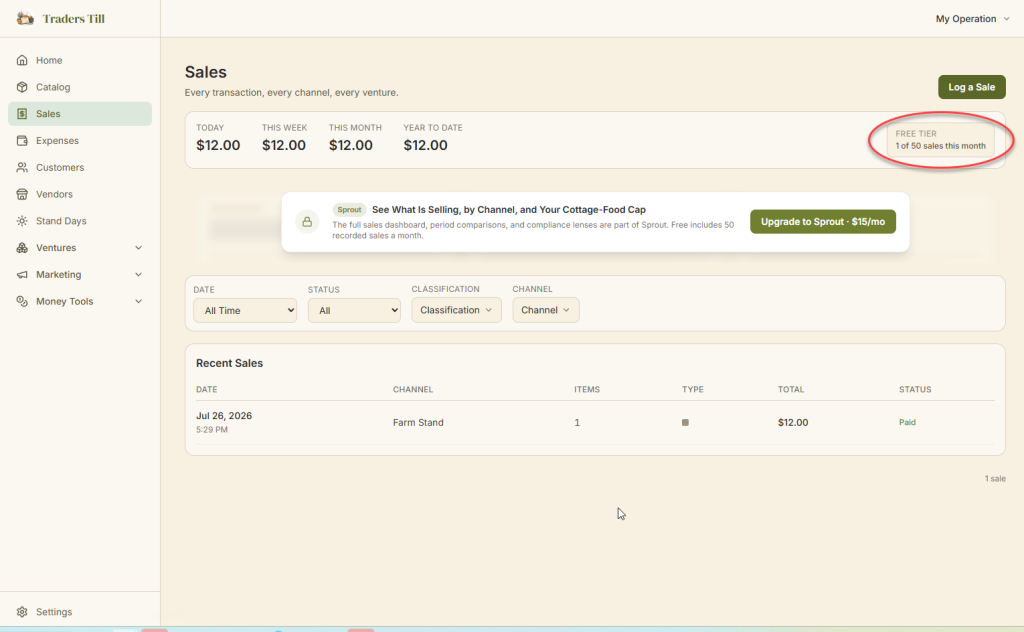
The chip changes as the month fills up:
- Up to 39 sales: a neutral “12 of 50 sales this month”.
- At 40 sales: it switches to a warning color and counts down, “10 sales left this month”. A matching banner also appears on the Sales page.
- At 50 sales: it turns red and reads “Free-tier limit reached”.
The Settings home page also shows a “Sales This Month” usage meter with the same numbers.
What counts toward the limit?
Every non-voided sale you record counts, whatever the channel, venture, or payment method. A few specifics:
- The counter goes by when you recorded the sale, not by its sale date. Backdating last Saturday’s market sales still uses this month’s slots. That keeps catch-up entry honest without letting the cap be dodged.
- All channels share one counter. Farm stand, farmers market, and everything else add up together.
- Voided sales do not count. Voiding says “this sale was a mistake, pretend it never happened”, so the slot frees up immediately.
- Refunded sales still count. A refund means the sale happened and money later went back. The original stays on the books and on the counter.
When does the counter reset?
The counter resets at midnight on the 1st of each month, in your operation’s timezone. Your timezone is set under Settings → Location. For a Pacific-time stand, July runs from July 1 at midnight Pacific through the end of July 31 Pacific. Late-night sales on the last day of the month land in the month you expect.
What happens when I reach 50?
The 50th sale saves normally, and then recording blocks. Opening the Quick Sale Pad brings up a message titled “Free-tier limit reached”: you have recorded 50 sales this calendar month, and you can upgrade for unlimited sales or wait until the 1st. The Sales page banner and the counter chip turn red at the same time.
Your online storefront pauses at the same moment, because an online order becomes a recorded sale too. Rather than letting a customer get blocked mid-checkout, the shop simply stops taking new orders: your public page shows a neutral note that the stand is not taking orders right now, and your plan is never mentioned to customers. The Storefront page in the app shows you the real reason with an upgrade link, and the shop reopens on the 1st or the moment you upgrade. Nothing about your storefront is deleted or unpublished.
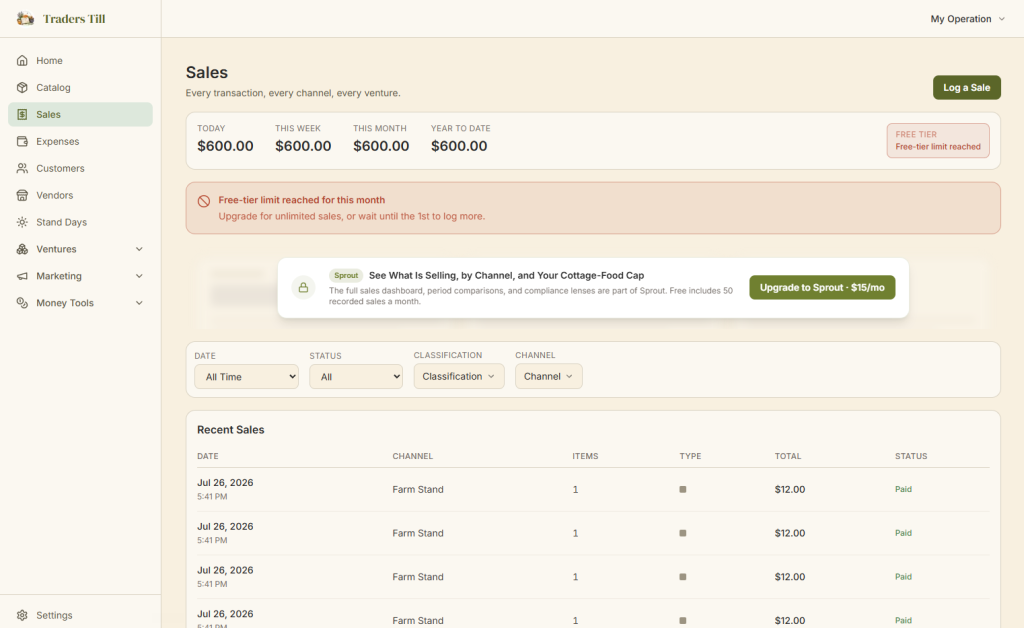
The block is enforced on the server, not just in the buttons, so there is no way to slip a 51st sale through, online or off. Everything else keeps working. You can still edit, void, or refund existing sales, log expenses, run production, adjust stock, and record donations.
How do I remove the limit?
Upgrade to any paid plan and the cap is gone, and a storefront paused at the cap reopens right away. Sprout is the first step up: $15/mo (or $5/mo at the founder rate) for unlimited sales, unlimited storefront listings, unlimited custom ventures, and the Reports & Analytics Hub.
- Open
Settings → Plan. - Tap Upgrade to Sprout.
- Complete the Stripe checkout page (this is where a card is added; Free never asks for one).
The change takes effect right away. The counter chip and warnings disappear, and the Plan page shows a checklist of what you just unlocked. For the full tier rundown, see Free vs Paid, What Each Tier Includes.
Common questions
Does voiding a sale free up a slot on the free tier?
Yes. The counter only counts non-voided sales, so voiding a mistaken sale frees its slot immediately. Refunds are different: a refunded sale still counts, because the sale really happened and stays on your books. If a sale should never have been recorded at all, void it instead of refunding it.
When does the free-tier sales counter reset?
At midnight on the 1st of each month, in your operation's timezone (set under Settings, Location). If your stand is in California, the counter rolls over at midnight Pacific, not at UTC midnight. When you hit the cap, the block message also tells you it lifts on the 1st.
Do backdated sales count toward the monthly limit?
Yes. The counter goes by when you recorded the sale, not by the sale date you set on it. Catching up on last Saturday's market this week still uses this month's slots. Backdating is completely fine for your books; it just does not dodge the cap.
What happens when I record 50 sales in a month on the free plan?
The 50th sale saves normally. After that, opening the Quick Sale Pad shows a "Free-tier limit reached" message, and no new sales can be recorded until the 1st of the next month or until you upgrade. Everything else in the app keeps working: expenses, production, stock, donations, and your existing sales history.
Does the free-tier limit block anything besides recording sales?
One thing: your online storefront stops taking new orders at the same moment, since an online order becomes a recorded sale too. Customers just see that the stand is not taking orders right now; your plan is never mentioned on your public page. Everything else keeps working: you can still view, edit, void, and refund existing sales, log expenses, run production batches, adjust stock, record donations and waste, and export your data.
Why did my storefront stop taking orders on the free plan?
A Free storefront pauses new orders in two situations: the month's 50 recorded sales are used up (it reopens on the 1st, or immediately on upgrade), or you have not signed in for 30 days (it reopens on its own shortly after you sign back in). Nothing is deleted either way, and the Storefront page in the app shows the reason and the fix.
Keep Reading