
Donations and Waste, Why They Belong in the Ledger

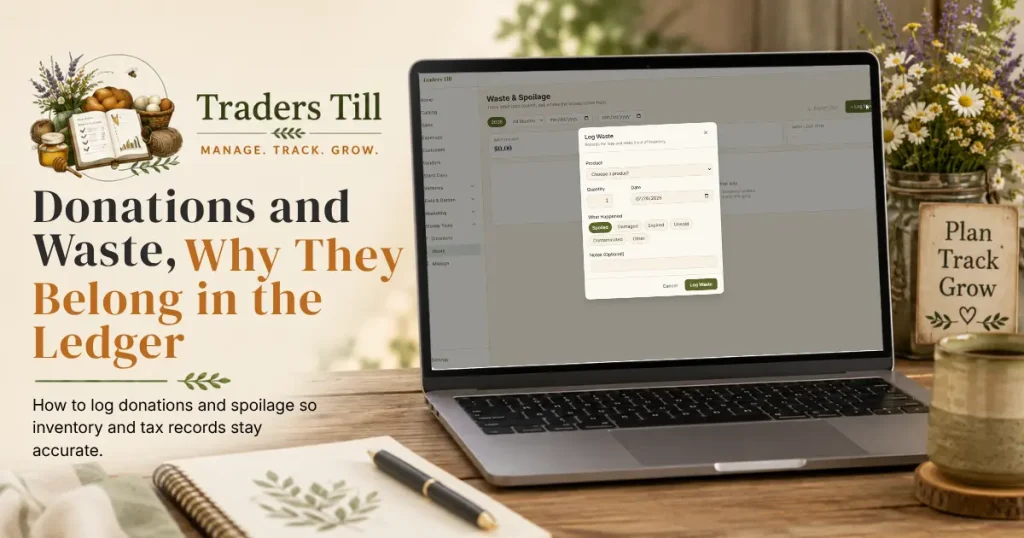
Giving a flat of tomatoes to the food pantry and tossing a batch of scorched granola feel like non-events. No money changed hands, so nothing to record, right? Wrong on both counts. Each one changed your inventory, and each one has a story your tax preparer will want. Traders Till gives them each a dedicated page under Money Tools in the sidebar: Donations and Waste.
Don’t see either page in your sidebar? Both are optional modules, and they start turned off. Open Settings → Modules and switch on Donations Tracker and Waste & Spoilage; the pages appear under Money Tools the moment you do. They are free modules, included on every plan. The full walkthrough is in Turning Modules On and Off.
Why should I log donations and waste at all?
Because both fix your stock counts and both build a paper trail you will want in April. Skipping them leaves ghost inventory on the shelf and deductions on the table.
- Your stock stays honest. Each entry removes the quantity from inventory the moment you log it, so the catalog matches what is actually on the shelf.
- Donations become a tax write-up as you go. The Donations page values every gift and exports the year in the shape of IRS Form 8283, the form for noncash charitable contributions.
- Waste becomes a diagnosis. The Waste page totals what the losses cost you and ranks the causes, so you can change what needs changing: bake less for the slow market, fix the cooler, adjust a recipe.
How do I log a donation?
Open Donations in the sidebar and tap Log a Donation. The dialog records the gift, values it, and takes it out of inventory in one pass:
- Pick the Product. The picker lists your active finished products; under it you’ll see the current on-hand count for tracked items.
- Enter the Quantity and the Date.
- Pick the Non-profit Name from your saved organizations, or tap + Add a New Non-Profit to save a new one. The address is optional but worth adding; Form 8283 asks for the address of larger donees.
- Check the Fair Market Value Per Unit. It prefills from the product’s price, and you can change it.
- Optionally fill the Form 8283 Details: Condition, Date Acquired, and How Acquired. The dialog notes when these matter: only when your total noncash gifts top $500 for the year, and you can skip date and how acquired for any single item deducted at $500 or less.
- Tap Log Donation.
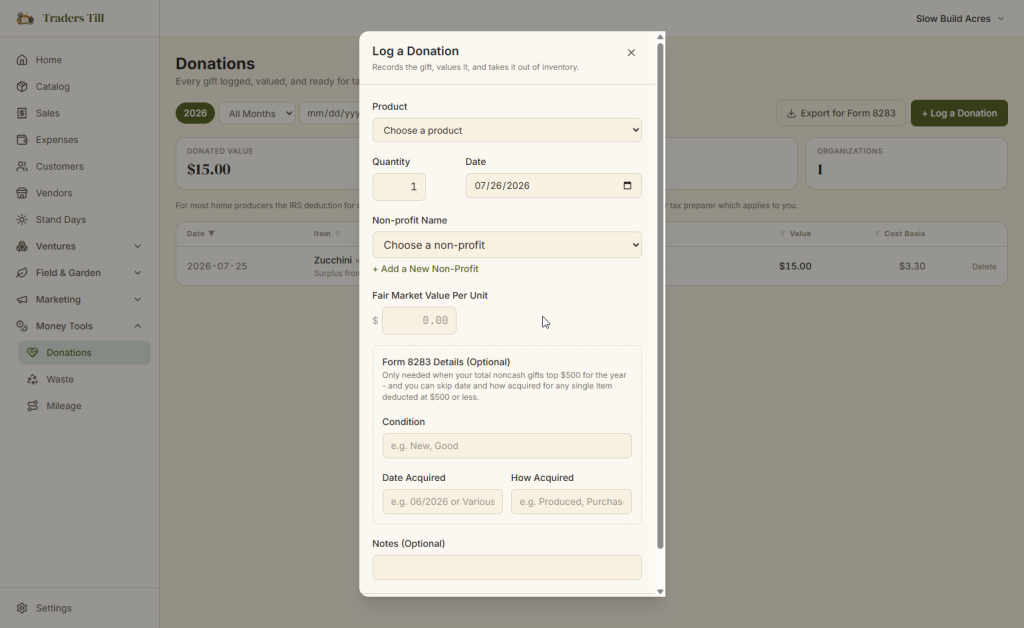
Every donation must go to a saved non-profit. If you try to record one against a regular customer, the app asks you to mark that customer as a non-profit first. Each entry snapshots the item’s venture, fair market value, and cost basis at donation time, so later price changes never rewrite your records.
The page rolls the year up into four numbers: Donated Value, Cost Basis, Donations, and Organizations. When tax season comes, Export for Form 8283 downloads a CSV laid out to match Form 8283 Section A, one row per donation, ready to hand to your preparer.
A note on the tax side, straight from the page itself: for most home producers the IRS deduction for donated inventory is the cost basis, not the market value. Traders Till tracks both so the right number is there either way. Which one applies to you is a question for your tax preparer.
How do I log waste or spoilage?
Open Waste in the sidebar and tap Log Waste. The dialog records the loss and takes it out of inventory:
- Pick the Product and enter the Quantity.
- Pick What Happened: Spoiled, Damaged, Expired, Unsold, Contaminated, or Other.
- Set the Date, add a note if it’s worth remembering, and tap Log Waste.
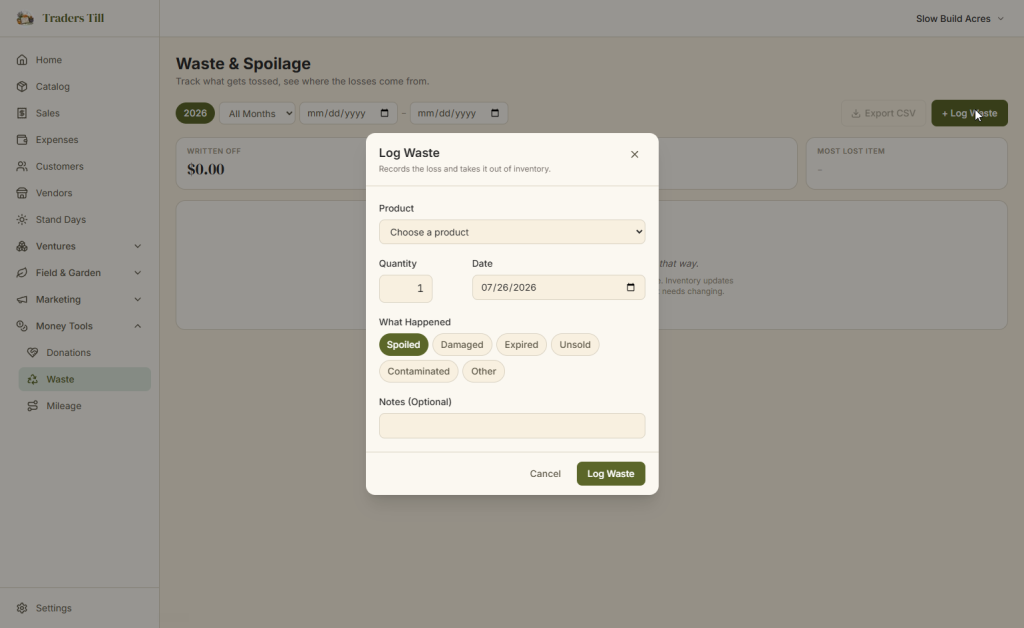
If you pick Unsold, the dialog offers a better idea before you commit: “Still good? A food pantry can probably take it,” with a Log It as a Donation Instead link that jumps straight to the donation dialog. Unsold does not have to mean wasted.
The Waste page totals the year as Written Off (the cost of everything discarded), Entries, Top Cause, and Most Lost Item. That last pair is the useful part: if Spoiled is your top cause and it’s always the same product, that is a production or storage problem with a name on it. Export CSV downloads the year’s write-offs.
What do donations and waste do to my stock and P&L?
Both remove stock immediately, and neither posts to your Profit & Loss. That second part surprises people, so here is the reasoning.
When you log either entry, inventory decrements right away, the same ledger that sales flow through. Deleting an entry reverses it and the stock comes back. If an entry would push a tracked item below zero, your negative-stock setting decides what happens (warn by default, or allow or block, set in Settings → Sales; the setting covers sales, donations, and write-offs alike).
On the money side, a donation is not an expense and a write-off is not a sale. Your P&L’s cost of goods comes from what you actually sold; donated and wasted product live in their own trackers with their own year-end totals and exports. Both record the standard two accounting dates under the hood, and since no cash moves on either one, the dates always match, so they never cause a cash-vs-accrual gap.
Why is personal use tracked somewhere else?
Because eating your own inventory is neither a donation nor a loss; it is just stock leaving the shelf. That is an inventory movement, so it lives in the catalog, not in the money trackers.
When you take a jar of jam inside for dinner, open the product in the catalog, use the Adjust stock quick action, choose the remove direction, and pick Personal use as the reason. The Quick Adjust reasons for removals are:
- Stock adjustment
- Personal use
- Gift (the form asks who you gave it to)
- Sample
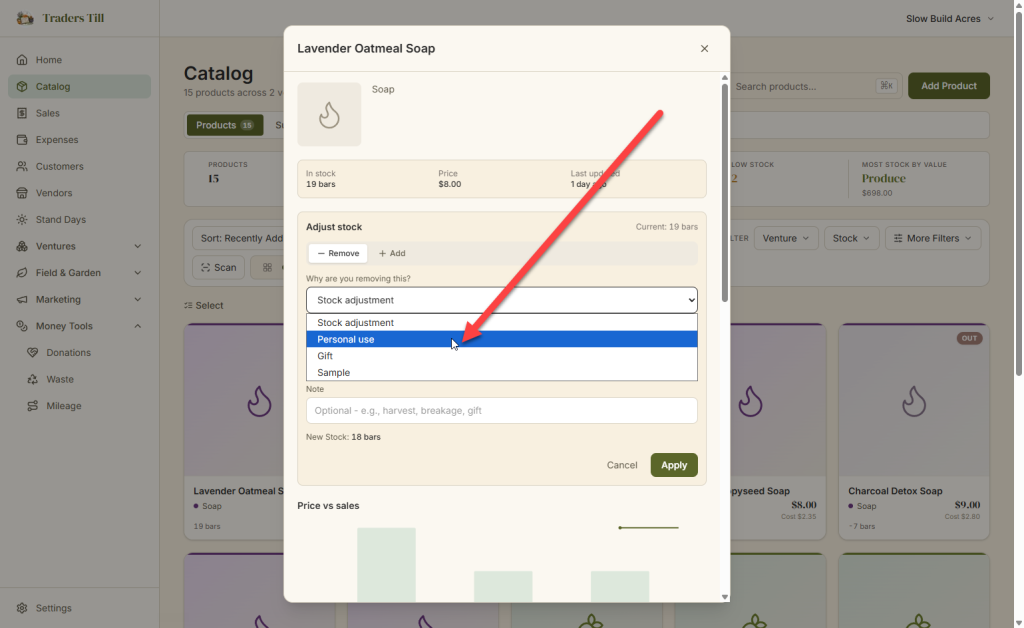
Notice that donation and waste are deliberately missing from that list. The Quick Adjust form even says so, with links: donating or recording spoilage belongs on the Donations or Waste page, so the value, cost, and cause get captured for taxes. A bare stock adjustment would fix your count and silently lose the write-up.
Personal use is not a business expense, and Traders Till does not pretend otherwise. Gifts to individuals and marketing samples have their own tax treatment, different from a charitable donation; the notes you leave on those adjustments give your preparer what they need to sort it out.
Sources
Common questions
Do donations count as a business expense in Traders Till?
No. A donation is recorded as an inventory movement plus a valued entry on the Donations page, not as an expense, so it doesn't change your Profit & Loss. For most home producers the IRS deduction for donated inventory is the cost basis, not the market value. Traders Till tracks both numbers; ask your tax preparer which applies to you.
What happens if a donation or write-off takes my stock below zero?
That depends on your negative-stock setting in Settings under Sales. The default is Warn: the entry saves and you get a heads-up naming the item with a link to adjust its stock. Allow saves silently, and Block refuses the entry until you fix the count first. The same setting covers sales, donations, and write-offs.
Can I donate supplies, like leftover jars or packaging?
Not in this version. The donation and waste pickers only list finished products from your catalog. Supplies are shared raw inputs whose cost is counted when they're consumed, so they can't be donated or written off here.
What happens when I delete a donation or a write-off?
The entry is removed and any stock it took out goes back. The confirmation message says so: "Donation deleted. Any stock it removed is back." Deleting is meant for entries logged by mistake, since it also removes the record from your year-end totals and the Form 8283 export.
Why can't I pick donation or waste as a reason in Quick Adjust?
On purpose. A bare stock adjustment would fix your count but skip the tax-relevant half: the donation's value and cost basis, or the write-off's cause and cost. The Quick Adjust form links you to the Donations and Waste pages instead, so the entry lands in the right tracker and the year-end export.
Keep Reading